Are you still troubled by low contrast, dim brightness, and lacklustre colours on your display? Fear not, as this article addresses precisely those concerns.
Let us explore HDR technology in LED displays and the benefits it can offer.
What is HDR Technology in LED Displays?
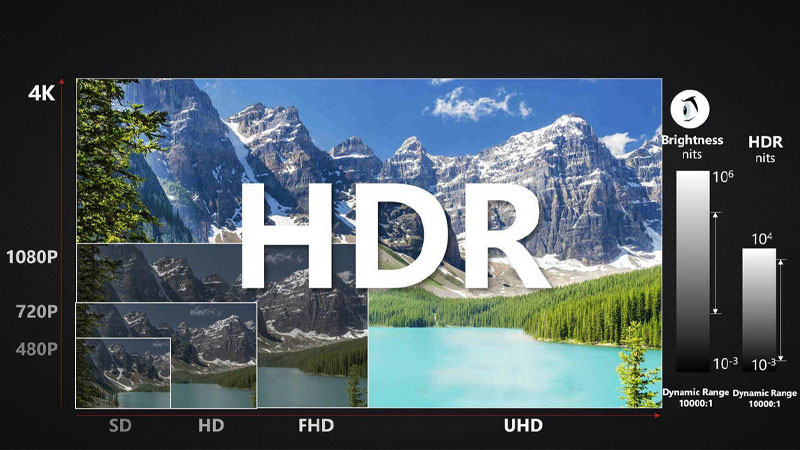
HDR technology in LED displays stands for High Dynamic Range.
This advanced image processing technique captures both the brightest and darkest areas of an image to enhance contrast, brightness, and colour accuracy, resulting in vivid and detailed visuals.
How does HDR enhance image quality in LED displays?
Greater shadow and highlight detail
Compared to traditional SDR displays, HDR perfectly resolves the challenge of balancing light and dark areas within an image.
It preserves both highlights and shadows, making highlights brighter and shadows deeper yet not dull, resulting in a perfectly rendered, colour distinct picture that delivers a more immersive experience.
Closer to human perception
HDR processing renders images on LED displays with softer lighting and richer, more natural colours, aligning closely with human visual perception for a heightened sense of realism.
Enhanced brightness
HDR technology boosts the luminance of LED display imagery, making brighter areas more dazzling and translucent without causing eye strain.
Additionally, it preserves minute details even at high brightness levels, enriching the overall visual experience.
Wider Colour Gamut
HDR technology in LED displays supports an expanded colour gamut, typically utilising DCI-P3 to Rec.2020 colour spaces. Compared to other techniques, this delivers a broader, more vibrant colour palette for your LED display, effectively capturing audience attention.
High Contrast
Implementing HDR technology in LED displays achieves superior contrast ratios.
Contrast ratios can reach 10,000:1 or higher, rendering bright areas more luminous and dark areas deeper, creating striking contrasts that lend your visuals greater dimensionality and realism.
How should I apply HDR to LED displays?
How does one utilise HDR technology on LED displays? Below, I shall detail this through both application principles and hardware requirements.
Usage Principles
To implement HDR technology on an LED display, seamless coordination with hardware components is essential to achieve the desired effect.
Furthermore, replicating the same HDR visuals on the display as seen on a computer requires leveraging the principle of computer mirroring.
Hardware Components:
Next, I shall explain how the graphics card and monitor used in conjunction with the LED display achieve HDR effects.
Computer Graphics Card
To achieve HDR effects, you must first utilize a computer graphics card. This component meticulously processes HDR image data before transmitting it to the computer, enabling the display of HDR imagery.
Subsequently, you need to connect the computer to the LED display through an integrated hardware and software setup.
This allows the LED display to replicate the identical HDR visual experience, delivering higher quality and clearer images.
Monitors
Pairing an LED display with an HDR capable monitor significantly enhances the overall visual performance of the screen, delivering high brightness, precise colour reproduction, and visually striking imagery.

Frequently Asked Questions
How can I determine if an LED display supports HDR?
To ascertain HDR compatibility, check the display’s system settings for an ‘Enable HDR’ option and ensure it is activated.
Additionally, verify the display’s brightness exceeds 1000 nits, as this threshold is typically required for HDR support.
Why does my HDR content sometimes appear dim?
Dim HDR content on your display may stem from two causes: either your monitor lacks proper calibration, or the HDR material was produced for higher brightness displays.
To address this, you can adjust the HDR brightness balance slider or use a display with higher brightness capabilities.
Can I achieve HDR on an older LED display?
No, as older LED displays lack the hardware necessary to match the brightness and contrast required for HDR functionality. However, you can utilize software features such as “simulated HDR”or “tone mapping” to achieve visuals approximating HDR.
Is HDR better for my eyes?
HDR is more eye friendly. It delivers greater contrast and colours closer to nature’s vivid spectrum, providing a comfortable viewing experience.
In contrast, SDR displays often exhibit less accurate colour reproduction and occasional colour distortion, which can cause eye strain.
JYLED—Outstanding HDR LED Display Manufacturer
JYLED specialises in researching and manufacturing HDR LED displays. Our screens employ advanced technology and integrate seamlessly with diverse hardware to fully realise HDR effects.
Should you subsequently purchase our LED displays, our technical specialists will guide you in utilising HDR functionality and provide comprehensive after sales support throughout the entire process.