



For an LED display to operate normally and show clear images, it relies on the receiving card to provide stable drive signals to the LED modules.
Today, we’ll explore the functional analysis of LED display for receiving cards in this article. The goal is to help you select the appropriate receiving card specifications when deploying an LED display.
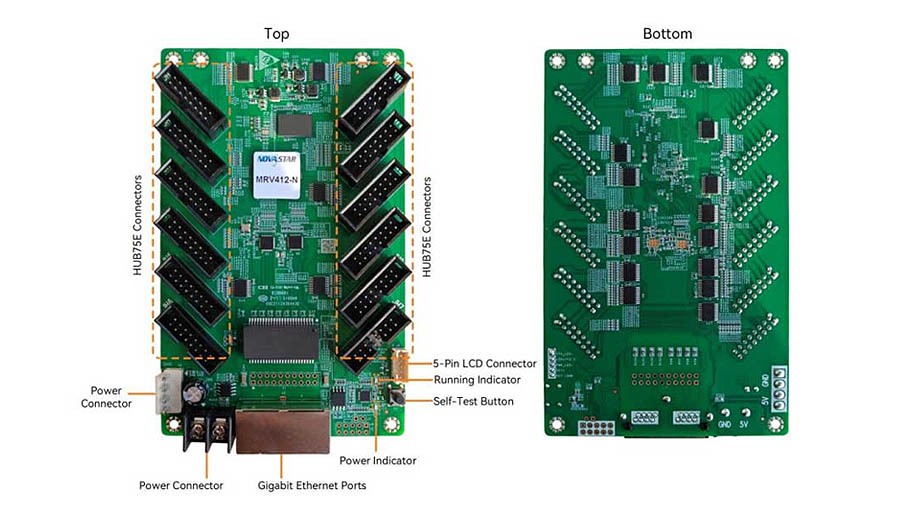
What Is an LED Display Receiving Card?
An LED display receiving card is essentially a circuit board primarily used to connect a controller or sending card to the LED screen.
Signals from the sending card or controller cannot be directly received and interpreted by the LED modules. The receiving card receives the signal source transmitted by the sending card, decodes it, and then passes it to the LED modules, enabling the LEDs on the modules to illuminate as required and display the desired content.
How Does an LED Display Receiving Card Work?
The operating principle of the receiving card for an LED display can be broken down into the following steps:
Step 1: Receiving Data
The source signal for the content displayed on the LED screen is generated by a content source device. After being transmitted, the signal is processed by the LED screen control equipment (such as an LED video processor, media player, or control card), and then the transcoded signal is sent to the receiving card via the sending card on the control equipment.
Step 2: Decoding the Signal
After the receiving card receives the serial or parallel data transmitted by the sending card, it converts the source signal into a format readable by the LED screen, specifically, a specific type of drive signal such as pulse width modulation (PWM), and transmits the converted signal to the LED modules.
Step 3: Driving LED Lamps
The receiving card reads the coordinates of the LED lamps within the LED modules and, based on the content source signal, precisely controls the brightness and color display of the LED lamps at the corresponding coordinates on the modules. This ensures that the LED modules accurately display the content according to the source image.
Core Functions of an LED Display for Receiving Card
The core functions of a receiving card are primarily divided into three categories:
Data Reception, Decoding, and Distribution
The primary function of the receiving card is to receive and read signals transmitted from the control device. Signals transmitted by the control device are typically serial data or Ethernet packets, while the signals readable by the LED display are usually PWM signals.
Without the receiving card to parse and transcode these signals, the LED display would be unable to read the signals and display the corresponding content. Simply put, the receiving card acts as a translator, converting the source signal from the sending card for the LED display.
After parsing the signals, the receiving card must also precisely distribute them to different pixels based on the X and Y coordinates of the LED lamps, driving them to emit light and form an image.
Brightness and Color Control
When driving pixels to emit light, the receiving card can manage the brightness and grayscale levels of individual pixels, ensuring that the screen’s display achieves an optimal viewing experience for the audience.
Data Monitoring
In some custom-developed systems, the LED display’s receiving card also supports monitoring and diagnosing the screen’s operational health, promptly reporting issues such as abnormal temperatures or power supply problems to the control system.
This data monitoring feature allows you to take timely corrective action when a fault occurs, preventing the problem from worsening and leading to screen downtime or component damage.
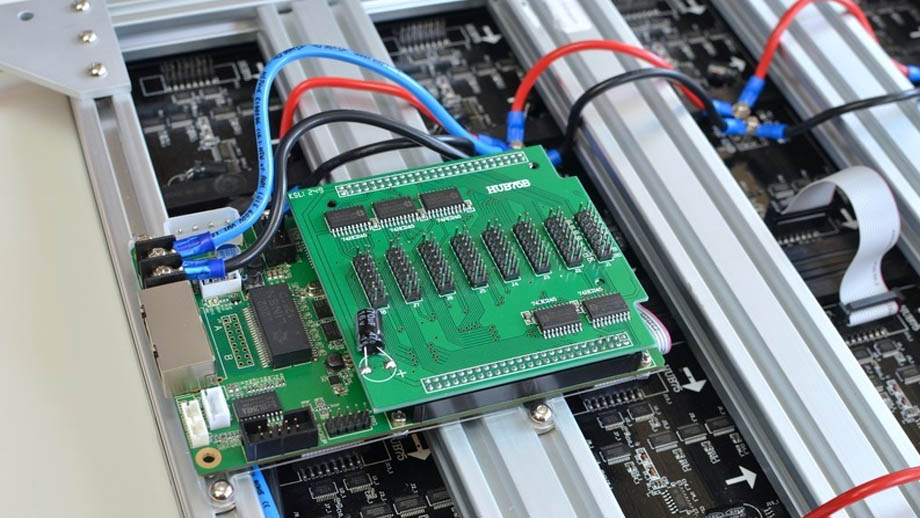
Receiving Card vs. Sending Card: A Comparison of Differences
While receiving cards play a crucial role in the operation of LED displays, the functions of LED sending cards should not be overlooked. Many new users may struggle to distinguish between these two components, so we’ve provided a simple comparison of their differences:
Main Functions
- Receiving Card: Receives signals from the sending card, converts them, and sends them to the LED modules to control the display of images.
- Sending Card: Reads signals from content source devices, parses and transcodes them into data readable by the receiving card, and sends the signals to the receiving cards in the LED display.
Load Capacity
- Receiving Card: Depending on the component model, a single receiving card can support between 60,000 and 260,000 pixels.
- Sending Card: Depending on the component model, a single sending card can support 650,000 to 2.3 million pixels, or even more.
Installation Location
- Receiving Card: Typically installed inside the LED display cabinet and connected to multiple LED modules via interfaces and cables.
- Sending Card: Can be installed in a standalone device (controller, media player) and connected to the receiving card via cables; it can also be inserted directly into a slot in the LED screen for use.
Number Installed per Project
- Receiving Card: Since a single receiving card can only support 2 to 6 LED modules, 1 to 2 receiving cards are typically installed inside each LED cabinet. The more cabinets an LED screen has, the greater the number of receiving cards required.
- Sending Cards: Sending cards have a higher load capacity; a single LED display typically requires only 1 ~ 2 sending cards to handle content processing needs.
Receiving Cards vs. Sending Cards: Quick Comparison Table
| Comparison Item | Receiving Card | Sending Card |
| Main Function | Receives signals from sending cards, parses them, and transmits them to LED modules | Receives signals from content source devices, transcodes them, and transmits them to receiving cards |
| Load Capacity | 60,000 ~ 260,000 pixels | 650,000 ~ 2.3 million pixels, or even higher |
| Installation Location | Inside LED cabinets | As a standalone unit or within LED screen card slots |
| Number Installed per Project | n ~ 2n (where n represents the number of LED cabinets) | 1 ~ 2 cards |
How to Purchase the Right LED Display Receiving Card?
If you need to equip your LED display with receiving cards, we recommend considering the following factors:
- Screen Area: The larger the LED screen area, the more LED cabinets you’ll need to install, and the more receiving cards you’ll need to purchase.
- Interface Compatibility: Different LED modules and control devices have different interfaces. You need to verify whether the screen and control devices support fiber-optic interfaces, Ethernet interfaces, etc. Selecting a receiving card with compatible interfaces is essential to ensure proper device connectivity.
- Budget: If your project budget is limited, you can opt for devices with relatively lower load capacity and ensure the screen is driven by increasing the number of receiving cards; conversely, you can choose receiving cards with higher load capacity to simplify the LED screen’s component structure.
- Receiving Card Brands: Novastar receiving cards offer superior quality but come at a higher price; Colorlight receiving cards also deliver outstanding performance at a more affordable price; Huidu receiving cards, on the other hand, represent the most cost-effective option and are ideal if your LED project aims to minimize deployment costs.
Common Issues and Solutions for Using LED Display Receiving Cards
How Can I Resolve Incorrect Image Sequencing or Color Errors on the LED Screen?
Image sequence or color errors on the display may be caused by errors in the LED cabinet wiring diagram configured in the control software. You’ll need to open the software to modify the wiring diagram or adjust the connection order of the display’s receiving card cables.
Why Isn’t the LED Display Lighting Up?
If the LED display isn’t lighting up, it may be because the receiving card’s power supply isn’t connected. You can check the receiving card’s indicator light to see if it’s powered on. If the receiving card is confirmed to be powered on, check the network connection.
What Should I Do if Parts of the LED Display Are Flickering?
Flickering in certain areas of the LED display may be caused by an unstable power connection to the receiving card in that area or poor contact between the receiving card and the LED modules. You’ll need to inspect the wiring connections in the flickering area to resolve the issue.
What Causes an LED Display to Lag?
Screen stuttering is typically caused by slow signal transmission or decoding rates. You should check for compatibility issues regarding the specifications of the connecting cables between the receiving card, sending card, and LED modules.
How Do I Resolve Uneven Color and Brightness on an LED Display?
Uneven color and brightness on an LED display may be caused by an outdated firmware version. You should use the control software to update the receiving card’s firmware and adjust the screen’s color and brightness uniformity.
Summary
The receiving card is a critical component for the operation and display of an LED screen; it manages various aspects such as the display patterns, brightness, and color of each LED module. Choosing the right receiving card not only helps you avoid unnecessary costs but also ensures that the screen’s display performs at its best.

