2K and 4K are two resolutions—one currently dominates the display market, while the other represents a direction of continuous development and improvement. They are ubiquitous in our daily lives, whether we’re shopping for display devices or watching online videos.
So, what are the differences between these two resolutions? And how should you choose between them in your daily life? This article provides a detailed overview to help you understand and make an informed choice.
What Is 2K?
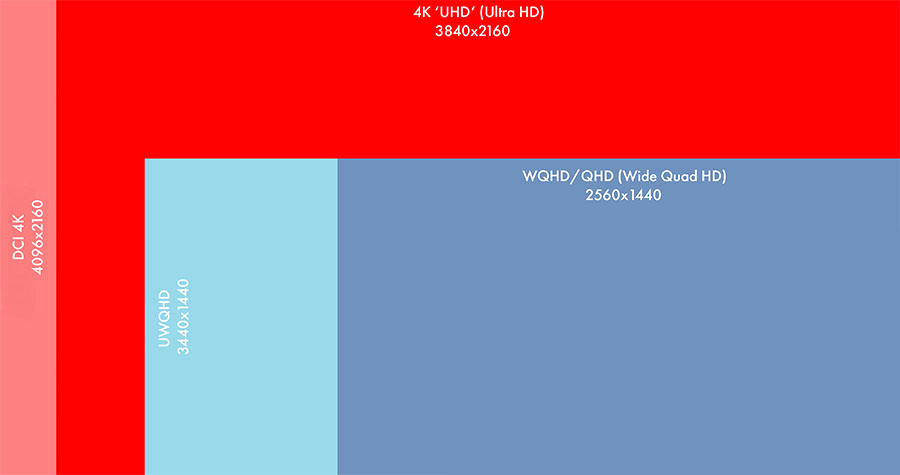
The Digital Cinema Initiative (DCI) defines the industry standard for 2K resolution as 2040 × 1080 pixels.
However, the resolution more commonly used in our daily lives is 2560 × 1440 pixels, also known as Quad HD (QHD) or 1440p. The “K” stands for a horizontal resolution of approximately 2,000 pixels, hence the name 2K.
What is 4K?
4K refers to a horizontal resolution of approximately 4,000 pixels.
There are two specifications for 4K resolution: the industry standard is 4,096 × 2,160 pixels; the consumer-grade standard we use daily is 3,840 × 2,160 pixels, also known as Ultra High Definition (UHD) or 2160p.
2K vs. 4K: Detailed Differences
Resolution
The main difference between 2K and 4K lies in resolution; generally, the higher the resolution, the sharper the displayed image. With 4K resolution, the number of pixels increases significantly, leading to a higher PPI and superior image quality.
However, aside from resolution, image quality is also influenced by other external factors such as compression ratio and compression methods. For example, for the same image, one saved in RAW format will show clearer details than one saved in JPEG format.
Number of Pixels
At a 2K resolution of 2560 × 1440 pixels, the total number of pixels is approximately 3.7 million; at 2040 × 1080 pixels, the total is about 2.2 million.
In contrast, at a 4K resolution of 3840 × 2160 pixels, the total number of pixels reaches approximately 8.3 million. At the standard resolution of 4096 × 2160 pixels, the total is approximately 8.84 million.
At standard resolution, 4K resolution is about four times that of 2K, and in consumer-grade displays, the total number of pixels is more than double, resulting in a significant improvement in the overall image quality and detail of 4K images.
Suitable Screen Sizes
The relationship between screen size and resolution is not particularly clear-cut; it depends more on the manufacturing technology of LCD panel manufacturers.
However, in everyday use, 2K resolution is more commonly found on screens under 27 inches, while a small number of screens use 4K. For screen sizes between 24 and 27 inches, 2K offers the best viewing experience.
Higher-resolution 4K, on the other hand, is more commonly used on large screens of 32 inches or larger.
Viewing Distance
Viewing distance is closely related to display size; generally, the larger the display, the greater the viewing distance.
For example, for 2K displays, a smartphone screen (6–7 inches) has a viewing distance of only 25–40 cm, while a computer monitor (27 inches) can have a viewing distance of 50–70 cm.
In addition, for LED displays, the viewing distance refers to the range within which the human eye can clearly see image details without perceiving individual pixels; therefore, the size of the LED screen must be customized based on the specific viewing distance.
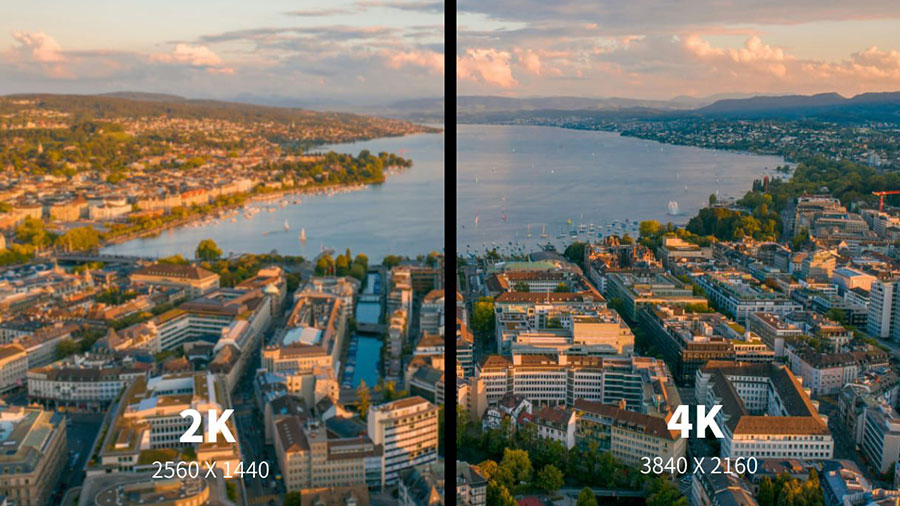
Image Quality
Image quality is primarily influenced by resolution, but it is also related to the quality of the image itself.
When comparing 2K and 4K versions of the same image, it is evident that the higher the resolution, the greater the number of pixels, and the higher the image quality. Consequently, 4K resolution offers a slightly better display effect than 2K.
4K resolution images deliver a more stunning visual experience, with smoother edges and sharper details, creating an immersive sensation.
Moreover, even when zooming in or out within a reasonable range, the image quality remains consistent, and fine details remain clearly visible.
Although 2K resolution is slightly inferior to 4K in terms of image quality, when both are displayed on smaller screens, there is virtually no difference in the visual experience.
Therefore, if 2K meets the requirements for your current screen size and viewing distance, there is no need to upgrade to 4K.
Content Availability
Content availability is higher for 2K resolution than for 4K.
The lower data volume of 2K resolution allows for smooth streaming over most modern networks. It takes up less storage space, so smooth transmission is possible without requiring high network bandwidth, ensuring a seamless viewing experience.
As the current mainstream resolution, 2K is suitable for both streaming media and office monitors, offering high content availability.
4K content requires higher network bandwidth and more storage space, which may cause users in areas with poor or limited network connectivity to forgo this option.
Furthermore, 4K resolution is still in the process of being refined, and some devices currently cannot support 4K content playback; therefore, the availability of 4K content is lower.
Device Compatibility
2K resolution places slightly lower hardware demands on devices than 4K. This is because 2K content has a smaller data volume, resulting in lower bandwidth, encoding, and storage requirements.
Consequently, most devices—such as smartphones, laptops, tablets, computer monitors, and some entry-level TVs—can support it, making it highly compatible with a wide range of devices.
4K content places higher demands on hardware; the storage space required alone is twice that of 2K content. For example, for a one-hour video, a 2K video requires only 2–3 GB of storage space, while a 4K video, even after compression, still requires 7–10 GB. In addition, hardware requirements such as bandwidth, encoding, and graphics cards are further increased, resulting in lower device compatibility.
HDR
When 2K and 4K resolutions are used on display devices, HDR is influenced by the device’s hardware; some devices with lower performance do not support HDR.
Devices that support HDR often use this feature to optimize image quality, typically by adjusting color and brightness.
Overall, the quality of HDR is generally determined by the display’s backlight technology and peak brightness, and has little to do with resolution.
When 2K and 4K are used as image resolutions, HDR functionality depends on the software used to open the image; if the software includes this feature, adjustments can be made; if not, adjustments are not possible.
For example, software such as Adobe Photoshop and Camera Raw includes HDR functionality, so it can be used directly.
Cost of Use
In most cases, using 2K resolution on the same device is less expensive than using 4K resolution. This is because 4K resolution—whether as a video format or on a display device—requires higher-performance hardware to operate, which drives up costs.
Similarly, using 2K resolution requires lower-performance hardware and is therefore less expensive.
Additionally, as a well-established display resolution, 2K benefits from mature manufacturing processes, high production volumes, and low costs. In contrast, 4K is still an evolving resolution; although its market supply chain is mature, production volumes are slightly lower than those of 2K due to constraints related to bandwidth and hardware performance, resulting in higher costs.
The table below provides a more intuitive comparison of the differences between 2K and 4K resolutions:
| Differences | 2k (QHD) | 4k(UHD) |
| Resolution | DCI: 2040 × 1080 pixels Consumer grade: 2560 × 1440 pixels | DCI: 4096×2160 pixels Consumer grade: 3840×2160 pixels |
| Number of pixels(Total) | DCI: Around 2.2 million Consumer grade: Approximately 3.7 million | DCI: Around 8.84 million Consumer grade: Approximately 8.3 million |
| Suitable sizes | 27 inches and under | Greater than 32 inches |
| Line of sight | Adjust according to changes in screen size; the larger the screen, the greater the distance | |
| Image quality | Better | Very good |
| Content availability | wider | narrower |
| Device compatibility | wider | General |
| HDR | Due to hardware performance and software limitations | |
| Cost of use | lower | Higher |
Performance of 2K and 4K in Different Fields
Audio-Visual Entertainment
The following factors influence the performance of 2K and 4K in audio-visual entertainment:
Network Quality and Price:
In regions with well-developed networks and affordable prices, 4K content can play smoothly, delivering ultra-high-definition visuals.
Conversely, in other regions, 2K content performs better and offers better value for money.
Screen Size:
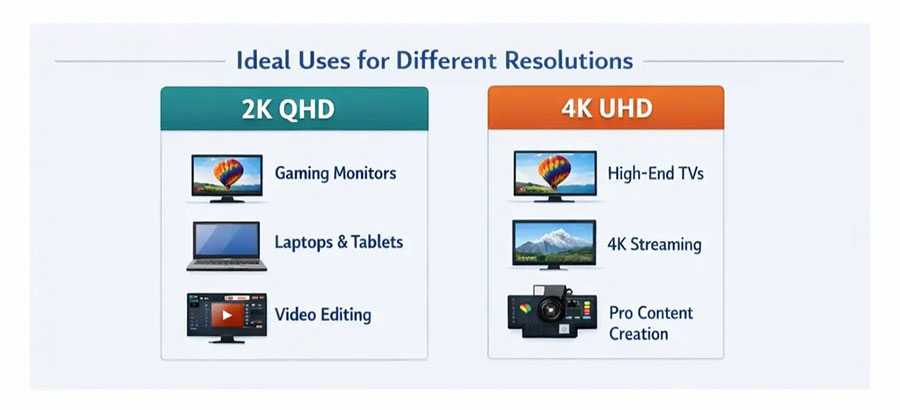
On smaller screens under 27 inches, 2K and 4K perform equally well, with virtually no difference. However, on larger screens such as projectors and TVs, 4K resolution delivers better performance and more refined details.
Specific Use Cases:
For professional design work, 4K offers superior performance, higher color accuracy, and clearer detail rendering, better meeting the needs of professionals.
In gaming, 2K achieves higher refresh rates with lower hardware requirements, delivering a better gaming experience; its overall performance and user experience are superior to those of 4K.
Content Viewing:
Performance between 2K and 4K varies depending on the content being viewed. For movies and sports events, 4K’s high HDR and superior color accuracy create an immersive experience and deliver higher-quality visuals.
For more relaxed programming—such as talk shows, lectures, and debate competitions—2K performs on par with 4K.
Streaming
Currently, many streaming platforms on the market support both 2K and 4K video and audio content, such as YouTube and Amazon Prime Video.
Although 4K content demands higher bandwidth, there is actually more 4K content available on streaming platforms than 2K, and it is more popular.
4K is becoming the mainstream standard on streaming platforms, while 2K serves as a good alternative for users with limited internet connections or hardware capabilities.
Film and Television Production
Currently, there are relatively few native 2K and 4K videos on the market.
However, since 4K content is more popular, there is a greater volume of 4K resources available.
In actual production, 4K content requires significantly more powerful graphics cards and other hardware than 2K to ensure smooth operation, resulting in higher production costs and longer rendering and loading times.
Nevertheless, 4K offers higher image detail than 2K video. Only a small portion of the 4K video or image content available on the market is native 4K; the majority of 4K resources are upscaled from 1080p.
Commercial Displays
Commercial displays often use LED or LCD screens, with the choice of screen type and resolution depending on the specific project and operating environment. However, LED screens are generally the more popular choice due to their longer service life.
Performance of 2K and 4K on Indoor LED Screens
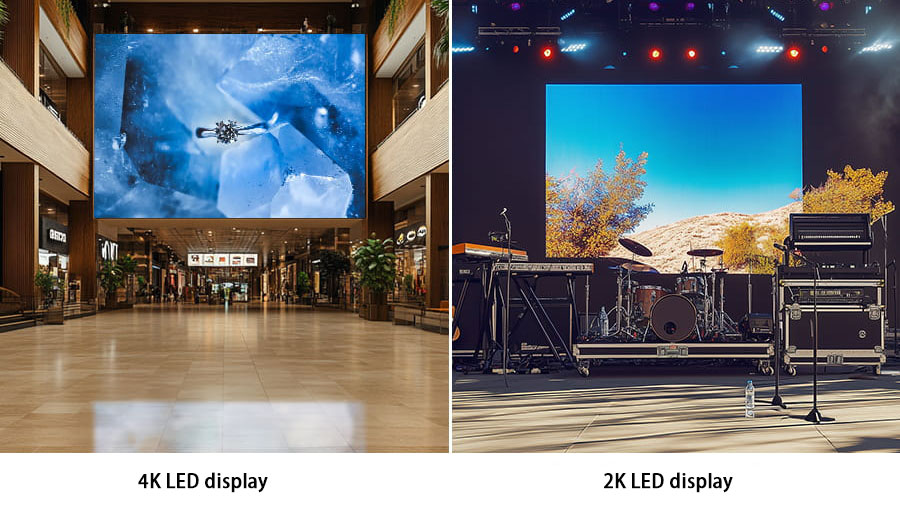
2K and 4K resolutions are commonly used for commercial displays on indoor LED screens. For outdoor applications, such high resolutions result in screens that are too large, leading to prohibitively high manufacturing, transportation, and installation costs.
Indoors, they are frequently used in scenarios with specific requirements for display effects and image quality, such as shopping mall advertisements, backdrops for large-scale events, and monitoring centers.
The screen size and resolution should be determined based on specific usage requirements and scenarios.
4K resolution delivers exquisite images with rich colors on both large and small screens, providing an excellent visual experience; 2K also produces clear and vibrant images on small screens, but on large screens, its ability to render image edges and certain details is slightly inferior to 4K.
When Should You Choose 2K Resolution?
- When the display device you’re using is 27 inches or smaller.
- When your device’s hardware performance is limited, and your internet speed is restricted.
- When you have a limited budget but still want to experience higher video clarity.
- When you primarily play competitive games and are seeking a smoother gaming experience.
When should you choose 4K resolution?
- When you want to experience an immersive visual experience on a large screen of 32 inches or larger.
- When you have a sufficient budget and are solely pursuing superior picture quality.
- When your hardware performance is good, and you’re in an area with a well-developed internet infrastructure.
- When you prioritize storylines and visual aesthetics over the thrill of competitive gaming.
Conclusion
Both 2K and 4K resolutions have their respective use cases and advantages, delivering high-quality visuals. Simply choose the resolution that best suits your specific usage scenario.
If you’re interested in LED displays and have customization needs, please feel free to contact us at JYLED. We’ll tailor an LED display solution specifically for your project requirements.
FAQs
Besides resolution, what other factors affect a display’s image quality?
Other factors affecting image quality include pixel density and refresh rate.
Pixel density refers to the number of pixels per unit area of the display and is closely related to resolution. When the physical size of the display remains constant, increasing the resolution raises the pixel density, resulting in better image detail and higher clarity.
Refresh rate refers to the number of times the image on a display is updated per second; it is both related to and independent of resolution.
When viewing different content at different resolutions, be sure to match the refresh rate accordingly to find the right balance for an optimal visual experience.
Can you view 4K images on a 2K display?
Yes. Compared to a 4K display, 4K images actually appear sharper on a 2K display. This is because when a 4K image is displayed on a 2K screen, the PPI (pixels per inch) increases, resulting in improved image quality.
Can the naked eye tell the difference between 2K and 4K images?
On small screens of 27 inches or less, the difference between 2K and 4K images is negligible regardless of viewing distance and is difficult to discern with the naked eye.
However, when displayed on screens larger than 27 inches, close-up inspection reveals distinguishable differences in image detail.
What does the future hold for resolution technology?
- In the short term, the industry will focus on 4K resolution to mature the technology and establish it as the new market standard.
- Resolution development won’t stop at 4K; it will advance toward even higher resolutions like 8K, bringing superior display technology to large screens.
- Higher resolutions and emerging technologies will also drive progress in VR, AR, and gaming.
Why do 4K and 2160p refer to the same resolution?
Both 4K and 2160p refer to a resolution of 3840×2160 pixels. The difference is that 4K refers to a horizontal resolution of approximately 4,000 pixels, while 2160p refers to a vertical resolution of 2,160 pixels.
However, the term “4K” is currently more widely accepted in the market, so it is more commonly used to refer to this high resolution.