



Novastar is one of the leading manufacturers of LED control software in the LED screen industry. Novastar calibration software is highly effective in addressing issues such as uneven brightness and color display on LED screens.
Let’s explore the Novastar calibration user guide through this article.

Why Use Novastar Calibration
During daily use of LED screens, we sometimes notice that the overall color or brightness of the screen is not completely uniform.
This is not a fault with the LED screen, but rather a color difference caused by the different wavelengths of visible light that the human eye can detect. The human eye can detect color differences with a wavelength as small as 3-4nm, while the wavelength error of LED chips manufactured by LED factories is within 10nm, which meets the specified standards.
For example, if two adjacent LED chips on an LED screen emit light with wavelengths of 646nm and 643nm, respectively, the color difference between these two chips fully meets factory quality standards. However, when displayed on the LED screen, we can still perceive a slight color difference with the naked eye. In such cases, we can typically resolve the issue using Novastar calibration.
Which issues with LED screens can be addressed using Novastar calibration?
Screen distortion
When the brightness of adjacent LED screen LEDs does not display as expected, some LEDs are too dim while others are too bright. Excessively high brightness can interfere with the display of nearby LEDs, causing distortion or warping of the display pattern in that area.
After Novastar calibration, the brightness of the LEDs is consistent, and the display pattern on the LED screen returns to normal, eliminating screen distortion issues.
Mosaic phenomenon
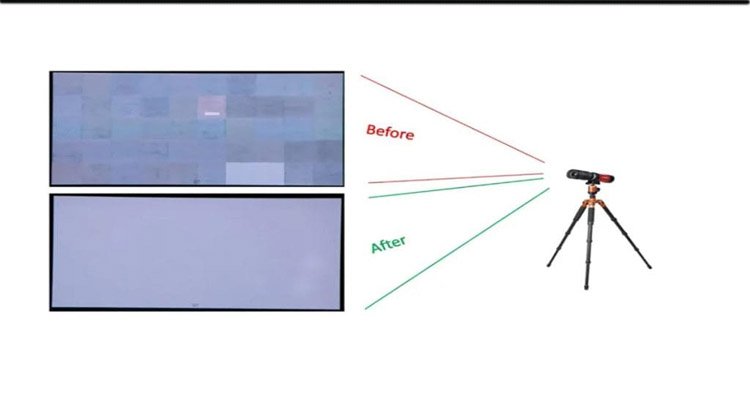
When the brightness uniformity of an LED screen is poor, certain display areas may exhibit noticeable halos or mosaic effects. By improving the brightness parameters of the LED screen through Novastar calibration, the brightness differences between LED pixels are reduced, optimizing the overall uniformity of the LED screen and achieving better display performance.
Color Inhomogeneity
Although LED modules of the same specification are produced using the same manufacturing processes and standards, modules produced a few days apart may exhibit slight variations in brightness and color.
When users purchase LED modules from different production batches and assemble them into an LED screen, noticeable color differences in block-like areas may appear. This is not a quality issue with the LED modules; calibrating the parameters of different LED modules using Novastar can resolve the issue.
Bright/dark line phenomenon
When installing an LED screen, we cannot guarantee that all seams between modules and between cabinets will be uniformly consistent.
If the seams are too tightly joined, with LED diodes too close together at the seam, the brightness at the seam will appear higher, creating a bright line visually.
When the joints are too loose, the distance between the LED diodes at the joints is farther than the spacing between other LED diodes, causing the brightness at the joints to appear lower, visually forming dark lines.
Using Novastar calibration to reduce the brightness of LED diodes forming bright lines and increase the brightness of LED diodes forming dark lines, ensuring they match the brightness of other LED diodes, resolves the bright line and dark line phenomena at the joints.
Novastar calibration components
Measurement Instruments
In addition to the components related to the LED display screen itself (computer, video controller, LED screen, etc.), we also need to prepare professional measurement instruments to measure the brightness and color display of the LED screen.
The main measurement instruments are cameras and colorimeters, used to record and collect brightness and color data from the LED screen display.
Calibration software
Download the Novastar calibration-specific calibration software, follow the software’s prompts to perform the relevant functional steps, use the camera to collect data, and have the Novastar calibration software analyze the data.
After analysis, the Novastar calibration software generates a calibration coefficient from the collected data and completes the LED screen calibration based on the calibration coefficient.
Main functions of Novastar calibration
Color Calibration
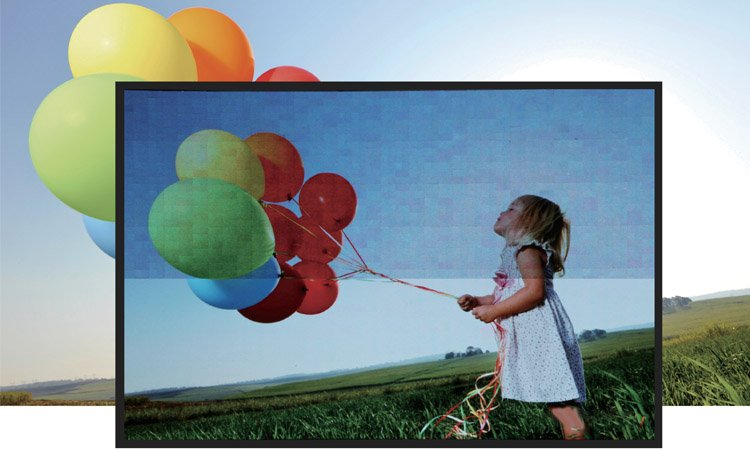
Color calibration is the primary function of Novastar calibration. The majority of calibration issues for LED screen displays are related to color differences.
Through Novastar calibration, not only can the color consistency of the LED screen be ensured, but color parameters can also be adjusted to display according to customer preferences, making the LED screen’s saturation higher or lower.
Brightness Calibration
Brightness calibration adjusts overly bright or dim display areas on the LED screen, whether linear or block-shaped regions. Novastar calibration enhances brightness in dim areas and reduces brightness in overly bright areas, ensuring consistent overall brightness across the LED screen.
Gamma Calibration
Novastar calibration adjusts the Gamma curve to ensure smooth and uniform transitions from dark to bright areas on the LED screen.
Edge Calibration
There may be noticeable differences in display quality between the edges of the LED screen and the center. These differences are primarily caused by variations in the performance of the driver ICs. Novastar calibration can improve brightness and color differences in the edge areas of the LED screen.
Types of Novastar Calibration
Novastar calibration primarily has two types: LED cabinet calibration, typically used on production lines, ensures consistent color and brightness across LED cabinets of the same specification from the factory; and LED screen calibration, typically applied on-site after LED screen assembly, targets specific LED screens for calibration.
LED Cabinet Calibration
Advantages
LED cabinet calibration is fast, with each cabinet calibrated in under 3 minutes, making this multi-cabinet systematic calibration more time-efficient.
Disadvantages
It can only reduce the color difference range between cabinets through Novastar calibration, and cannot guarantee completely consistent display effects after assembly.
LED Full-Screen Calibration
Advantages
After Novastar calibration, the display effect of the entire LED screen is completely consistent, with a harmonious and unified overall viewing experience and no noticeable display differences. It also allows for on-site adjustments to LED screen color and brightness parameters to enhance display quality.
Disadvantages
LED full-screen calibration requires technicians to bring relevant equipment to the installation site for calibration, which is a cumbersome process and must be conducted at night.
Basic Steps for Novastar Calibration
Calibration Environment
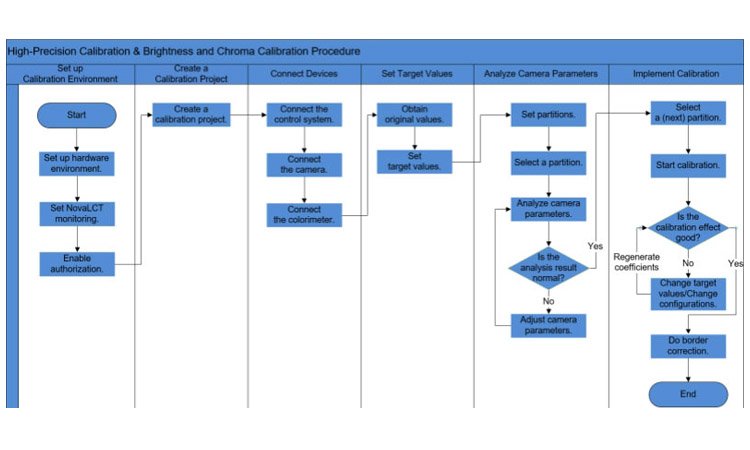
Enter the current environmental conditions of the hardware equipment in the Novastar calibration software on the computer. Color and brightness parameters of the LED screen may vary under different environmental conditions, so it is essential to accurately input the environmental conditions.
Calibration Projects
Novastar calibration typically has three calibration modes: brightness and chromaticity calibration, full grayscale calibration, and low grayscale calibration. Different calibration modes collect and analyze different parameters.
Connecting Equipment
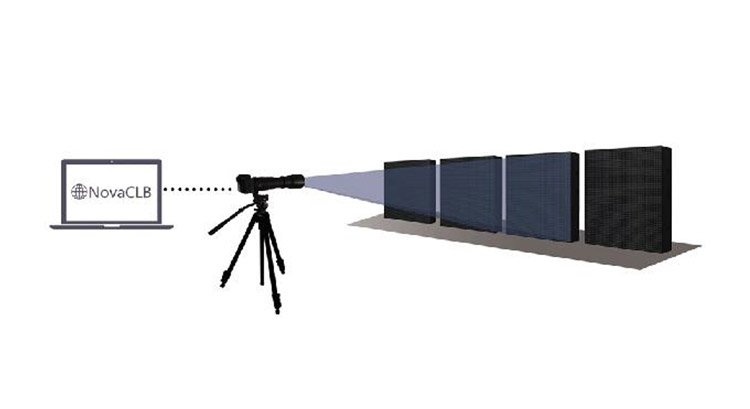
First, set up the connections between the computer, video controller, and LED screen. Then connect the computer to the camera, ensuring the camera’s angle and field of view for capturing the LED screen are appropriate. Finally, connect the colorimeter.
Set Target Values
Begin the calibration test to obtain the LED screen’s raw values, then input the expected values into the calibration software.
Analyze Camera Parameters
Divide the LED screen into zones and analyze whether the camera parameters within each zone fall within the normal testing range. If the camera parameters are abnormal, re-adjust the camera parameters to obtain the original values. If the camera parameters are normal, proceed to the next step.
Zone Calibration
Calibrate the LED screen based on the zones. If the calibration results are unsatisfactory, re-enter the target values and repeat the calibration process until the overall display of the LED screen achieves the desired effect.
Other LED Screen Calibration Solutions on the Market
Colorlight
Colorlight is another professional LED control software company in the market. Colorlight calibration supports three mainstream calibration modes and has powerful color processing capabilities, resulting in a more aesthetically pleasing display after calibration.
Huidu
Huidu calibration software features a simple and elegant user interface with intuitive operations, allowing users to easily attempt screen calibration.
Additionally, Huidu software updates quickly, enabling users to update the software in real-time for calibration and achieve uniform LED screen viewing effects.
Conclusion
After installing an LED display screen, if the display effect does not meet expectations, there is no need to worry. You can try using Novastar calibration software to resolve display discrepancies.
Novastar calibration software is a professional LED screen calibration solution that addresses a wide range of issues. If you encounter other challenges during the process, you can consult JYLED, and our technical experts will assist you in resolving related issues.

