When shopping for a monitor, people often need to consider both resolution and pixel density, hoping to find the optimal combination of the two to achieve the most comfortable viewing experience.
The following section will provide a detailed explanation of these two specifications and the corresponding selection methods to help you make a better choice when purchasing a display.
What Is Pixel Density?
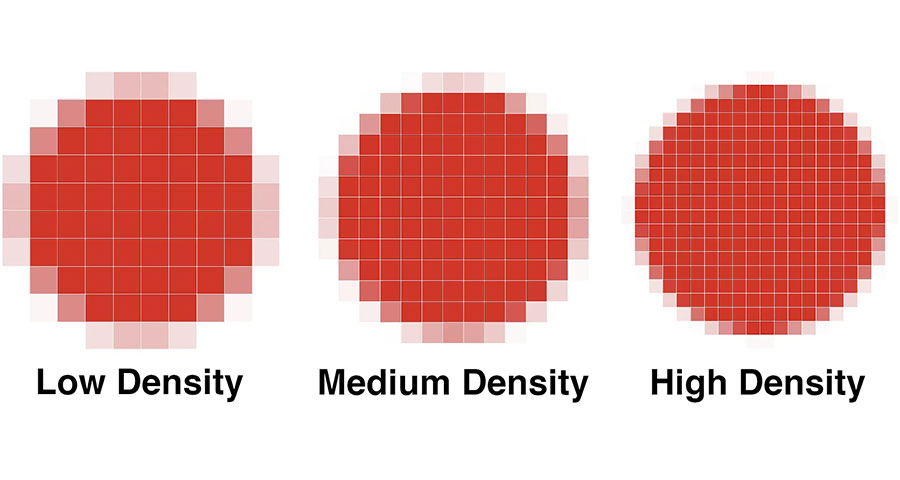
Pixel density, also known as pixels per inch (PPI), refers to the number of pixels contained in each inch of a display. It measures how densely pixels are arranged in physical space.
For example, 96 PPI means there are 96 pixels per inch. This applies to pixel density in LCDs.
In LED displays, pixel density refers to the number of LEDs per square inch. For example, 96 PPI means there are 96 LEDs per square inch.
What Is Resolution?
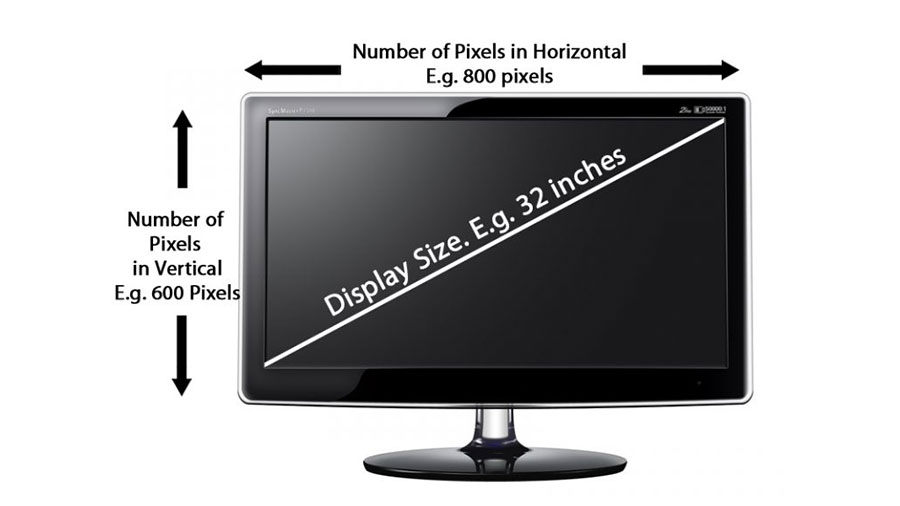
Resolution refers to the total number of pixels in a display device and is typically expressed as “horizontal pixels × vertical pixels” (width × height).
For example, “2560×1440” means there are 2,560 horizontal pixels and 1,440 vertical pixels, for a total resolution of 3,686,400 pixels.
In some display devices, screen resolution is often denoted by the horizontal or vertical pixel count alone (e.g., 1080p, 2K, 4K, etc.).
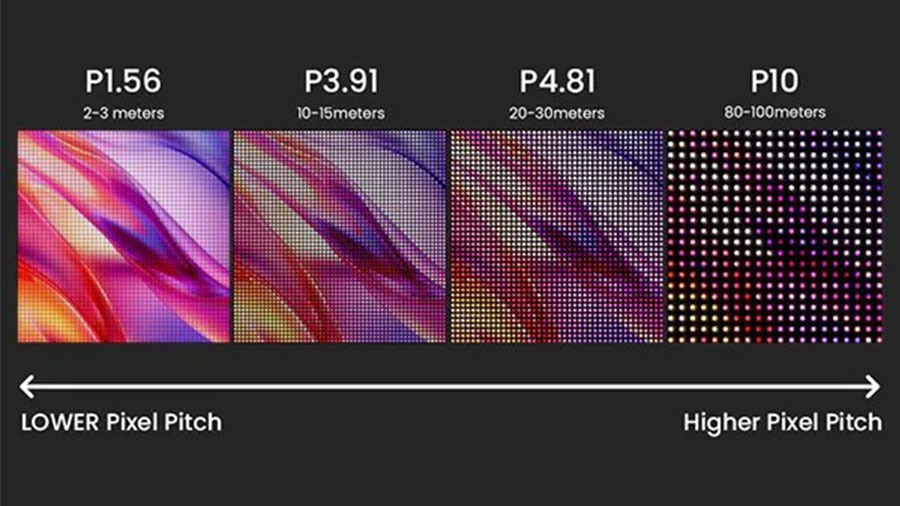
The Relationship Between Pixel Density, Resolution, and Screen Size
Pixel density, resolution, and screen size are closely related and influence one another. Pixel density is the ratio of resolution to the corresponding screen size. In other words, for the same resolution, the smaller the screen size, the higher the PPI.
For example, a Full HD resolution of 1920×1080 has a pixel density of approximately 82 PPI on a 27-inch display, whereas on a 6-inch smartphone, the pixel density is approximately 367 PPI.
Different PPI values result in varying image quality:
- The lower the PPI, the more likely the displayed image is to exhibit pixelation and jagged edges along the edges, resulting in a rougher appearance and slightly poorer display quality.
- A higher PPI reduces the appearance of pixelation and jagged edges, leading to higher overall image quality.
Pixel Density vs. Resolution: The Difference
Definitions
Pixel density refers to the density of individual pixels, while resolution indicates the total number of pixels in an image.
Calculation Methods
Resolution is typically calculated by multiplying the width by the height to determine the total number of pixels, using the formula:
Horizontal pixels × Vertical pixels
Pixel density, on the other hand, is calculated using both resolution and screen size, with the formula:
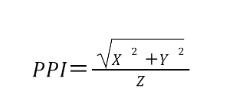
- X represents the screen’s horizontal pixel count
- Y represents the screen’s vertical pixel count
- Z represents the screen’s physical diagonal size (in inches)
Factors Affecting Resolution
Resolution is influenced by the total area of the LED display and the dot pitch. If the total area remains constant, a smaller dot pitch results in higher resolution; if the dot pitch remains constant, a smaller total area results in lower resolution.
Pixel density is primarily influenced by resolution and the corresponding screen size. As shown in the formula, PPI is positively correlated with resolution and negatively correlated with screen size.
Impact on Display Quality
These two parameters emphasize different aspects.
Resolution primarily affects the overall image quality, specifically in terms of image size and the richness of detail. Pixel density, on the other hand, focuses more on the level of detail and the fineness of the displayed image.
Pixel Density vs. Resolution Comparison Chart
The table below provides a more intuitive illustration of the differences between pixel density and resolution.
| Difference | Resolution | Pixel density |
| Unit | Pixel | PPI |
| Concept | The total number of pixels on the screen | Pixels per inch (LCD) Number of LEDs per inch (LED) |
| Factors influencing | This is influenced by the physical dimensions of the screen and the dot pitch | Depending on the resolution and screen size |
| Display results | The overall sharpness and level of detail in the image | The level of detail in the visuals |
Does a higher resolution always mean a clearer image?
Resolution is just one of the parameters that affects image clarity. To achieve a sharper image, several factors must be considered comprehensively:
The Impact of Screen Size
PPI, another key parameter affecting image clarity, is determined by the ratio of resolution to the corresponding screen size. If resolution increases but the screen size also becomes larger, the resulting PPI may not necessarily be higher—it may even decrease—and image clarity could consequently decline.
Limitations of Content Source Resolution
If the source material itself has a resolution of only 720p, even when played on a 4K display, the resulting image quality will remain at 720p and will not achieve 4K ultra-high-definition quality.
System Scaling and Image Scaling
System scaling is typically performed on a proportional basis, with corresponding image adjustments made during the scaling process. However, when the screen is zoomed in excessively, text may appear blurry, resulting in reduced clarity.
Image scaling also affects image clarity. For example, when you stretch an image in Adobe Photoshop, enlarging a high-resolution image beyond a certain point will cause jagged edges and visible pixels to appear, resulting in a decrease in overall image clarity.
Conversely, appropriately reducing the size of a low-resolution image can visually improve the image’s clarity slightly.
The Impact of Viewing Distance
Viewing distance determines whether people can directly see the individual pixels on the screen.
With LED displays, the closer you are to the screen, the more image details you can make out, but the pixelation also becomes more noticeable; conversely, at a greater viewing distance, the human eye blends minor imperfections into the overall image, making the entire display appear smoother.
For example, when viewing a large outdoor P10 LED advertising screen from a distance of 10 meters or more, the image appears clear and smooth; however, when approaching the screen to within 1 meter, the individual LEDs become clearly visible, resulting in a pronounced grainy texture and reduced clarity.
In standard LCDs, viewing distance has little effect on image clarity; even at close range, the image does not appear grainy. This is because the liquid crystal molecules in LCD screens are nanoscale particles that are invisible to the naked eye.

How to choose the appropriate resolution and pixel density for an LED display?
Selecting an LED display requires a multifaceted approach based on the specific application.
Determine Screen Size
First, determine the physical dimensions of the LED screen based on the usage environment and available space. The size of the LED screen’s surface area plays a decisive role in the total number of pixels it can accommodate and also has a certain impact on the upper limit of resolution.
If the pixel pitch remains constant, the larger the LED screen’s surface area, the more LEDs it contains, and the resolution will increase accordingly.
Determining the Primary Viewing Distance
The primary viewing distance in an actual project significantly influences the selection of pixel pitch and pixel density. For LED displays, the pixel pitch (in mm) is typically considered the minimum viewing distance (in meters), which serves as the basis for selecting the pixel pitch.
This distance represents the threshold at which the human eye can no longer perceive individual pixels, and it is key to ensuring image display quality.
For example, the minimum viewing distance for a 1-square-meter P2.5 LED screen is 2.5 meters. If you wish to maintain good visual quality at closer distances, you can opt for a small-pitch LED screen with a finer pixel pitch (such as P1.5 or P1.25).
Identify Content Type and Application Scenarios
Make the most appropriate selection based on the specific display content and application scenarios.
For high-end settings such as large shopping malls and brand stores, where detailed and vivid videos or images are displayed, select a small-pitch LED screen with higher resolution and pixel density to ensure image clarity and color accuracy.
Beyond image display, in scenarios such as airports and subway stations—where high-density displays of flight information and announcements are required—high-resolution LED screens are also necessary to ensure the visibility of the displayed content.
Balancing Clarity, Performance, Power Consumption, and Budget
Higher resolution and pixel density mean that the performance of other hardware components in the LED display—such as control cards and driver ICs—must be scaled accordingly, which naturally increases the project budget.
Therefore, provided that viewing distance and content requirements are met, select specifications that just meet the threshold for visual clarity; avoid blindly pursuing higher resolution.
This approach ensures the project achieves the optimal balance between visual impact and cost.
How to Choose the Right Resolution and Pixel Density for Other Display Devices?
When selecting the resolution and pixel density for display devices, an excessive pursuit of higher resolution may not fully leverage its advantages and can instead result in over-specification.
Therefore, choose the appropriate settings based on the intended use and viewing distance.
Smartphones
The typical viewing distance for smartphones is around 30–40 cm. A pixel density of 300 PPI or higher is recommended to achieve Retina-level quality and deliver excellent display performance.
Currently, the mainstream resolution for smartphones on the market is FHD+ (1080×2400), which provides a clarity of over 400 PPI for a 6-inch smartphone—fully meeting user needs.
Tablets
The viewing distance for tablets is slightly farther than that for smartphones, typically 40–60 cm. A pixel density of around 250 PPI is sufficient to provide a detailed image and sharp text.
A common 10.9-inch tablet with a resolution of 2360 × 1640 pixels displays text and images clearly enough to meet most usage needs. If used for professional design or drawing, a higher resolution can be selected.
Desktop Monitors
Desktop monitors are used at a greater distance—around 60–100 cm. For everyday office work and simple document viewing, a 24-inch Full HD (1920 × 1080) monitor (approximately 92 PPI) is more than sufficient.
For professional applications such as design, video editing, or photo retouching, 2K or 4K resolutions are recommended to display fine image details and achieve higher work efficiency.
LCD TVs
The viewing distance for LCD TVs is influenced by the viewing environment and screen size, typically ranging from 1.3 to 3 meters.
For a living room, where the viewing distance is typically around 2–3 meters, a 55-inch 4K TV will fully meet your viewing needs and provide an excellent viewing experience.
However, if the viewing distance is closer—such as in smaller spaces like a bedroom or study—a 32–40-inch Full HD TV will provide sufficient picture quality.
The table below lists common display sizes used in daily life, along with their corresponding pixel densities and resolutions.
| Type | Standard sizes | Resolution | Pixel density(PPI) | Display results |
| Smartphone | 6 inches | 1080×2400 | Approximately 439 | There are virtually no visible pixels, and the visual effect is excellent |
| Tablet | 10.9 inches | 2360×1640 | Approximately 264 | The images are clear, and the text is sharp, providing an excellent visual experience |
| Desktop monitor | 27 inches | 1920×1080 | Approximately82 | It ensures image clarity and meets basic usage requirements |
| Desktop monitor | 27 inches | 3840×2160 | Approximately163 | The image is more detailed, and the result is slightly better |
| LCD television | 55 inches | 3840×2160 | Approximately68 | The viewing experience is better at medium to long distances; it is somewhat reduced when viewed at close range. |
Conclusion
Resolution and pixel density are two indispensable factors for understanding display image quality. Resolution determines the overall clarity and detail of the image, while pixel density determines the level of finesse and the quality of those details—both are essential.
If you’d like to select an LED screen with the optimal combination of specifications for your project, please feel free to contact us at JYLED. We’ll provide you with the highest-quality customized solutions and the most comfortable viewing experience based on your specific project requirements.
FAQs
Can low-resolution content be displayed on a high-resolution screen?
Yes. Low-resolution content will be scaled by the system to fill the entire high-resolution screen, but the clarity of the content is limited by its native resolution; it will not become sharper, and the resolution will not change.
Is screen size the same as screen resolution?
Screen size is not the same as screen resolution; these are units of two different dimensions and cannot be equated.
Screen size refers to the physical dimensions of the screen, measured in inches along the diagonal.
Screen resolution refers to the number of pixels on the screen, measured in pixels, calculated by multiplying the horizontal and vertical pixel counts to determine the total number of pixels on the display.
What is the difference between PPI and DPI?
Both PPI and DPI refer to pixel density, but they are used in different fields.
PPI is commonly used in the display industry; it represents the number of pixels per inch and is closely related to the clarity of the displayed image.
DPI is commonly used in the printing industry; it represents the number of dots a printer can print per inch.
What are the common resolutions for LED displays today?
The resolution of LED displays is typically customized based on specific projects and applications, and is closely related to common screen sizes and dot pitch.
For the same screen area, indoor LED displays use a smaller pixel pitch and have a higher pixel density, so their resolution may be higher than that of outdoor LED displays.
Why do 4K LED screens have different levels of clarity?
Screen clarity is not determined solely by resolution; it is influenced by a combination of factors, including screen size, pixel density, packaging technology, dimming technology, and hardware performance.
Therefore, even among 4K LED screens, differences in these other factors can lead to variations in clarity.