



Whether you’re buying an LCD screen, an LED display, or designing images and shooting videos, you’ll always hear or see the term “4K resolution”. However, not many people have a full understanding of it. We will analyze the information of 4K resolution from a professional point of view.
What is 4K resolution?
4K resolution is a generic term that usually refers to a horizontal pixel count of around 4000. Did you notice? We said around 4000, not 4000. Because 4K resolution is just an agreed-upon generic term that has not been rigidly standardized, 4K resolution contains completely different horizontal pixel points than vertical pixel points in different fields. Here are a few common application areas:
- Graphic design or video capture: 3840 x 2160 pixels
- TV or LCD screen: 3840 x 2160 pixels or 3840 x 2400 pixels
- Digital movie industry: 4096 x 2160 pixels
Why are there so many different specifications?
In fact, in the electronics industry, we are familiar with the vast majority of terms are not standardized, such as type-c interface, the capacity of the hard disk, USB, high-definition video, etc. 4K resolution is certainly no exception.
And the reason why different fields contain different pixel points is because different calculation methods are used to calculate 4K resolution. One is native output and the other is pixel shift. Let’s dive into the differences between the two separately.

Two methods of calculating 4K resolution
Native Output
Native output is one of the simplest and most straightforward ways. Instead of processing the pixel points, it outputs the scanned pixel points directly, so it doesn’t damage the quality of the image and doesn’t process the image in any way.
Pixel Shift
Pixel shifting is a disassembly of the native output. This allows hardware manufacturers to achieve higher pixels with fewer pixel points. When native 4K is broken down into two or more subsets of pixels that contain part of the original 4K image, when processed quickly by an image processor, through the superimposition effect, we can also see near 4K picture quality.
Native 4K vs. pixel shifting
Since some manufacturers have discovered that 4K-like effects can be achieved by means of pixel shifting, all application scenarios related to 4K resolution, from hardware (e.g., projectors) to multimedia playback (e.g., online videos), can be faked on the market.
On the one hand, due to the native output 4K quality of the hardware requirements are extremely high, and secondly, the native 4K takes up more space and is more expensive, so at present, the industry, the vast majority of the 4K quality of the 4K resolution on the basis of pixel displacement.
And many video sites in order to deceive consumers to spend more money to open 4K quality, will use resolution interpolation, bit rate compression, etc., will be 2K quality or even lower quality, forcibly upgraded to 4K.
So how are we going to determine the difference between native 4K and pixel displacement?
If it is the hardware we can consider through the price, the projector, for example, all the projectors on the market less than 10,000 CNY are not native 4K. And for the online website video or picture, in the case of counterfeiting is particularly serious, the ordinary consumer usually can not distinguish through the naked eye.
Only in the case of particularly serious counterfeiting (such as the 2K forcibly upgraded to 4K), we can see the details of the picture quality through the naked eye has obvious blurred or distorted.
Comparison of 4K resolution with other resolutions
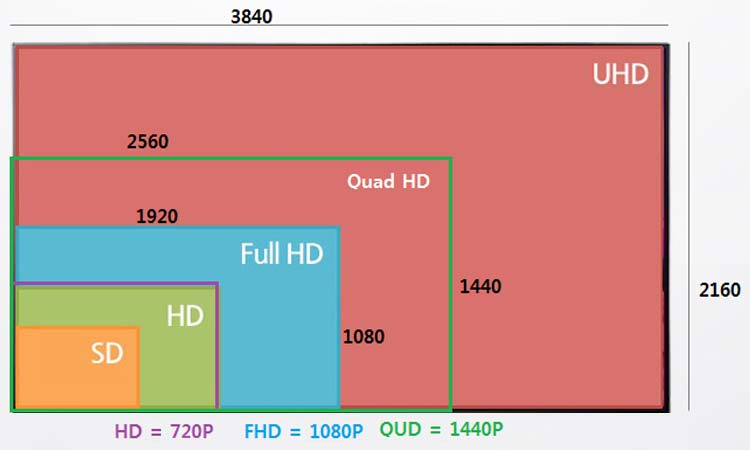
4K and 1080P resolution
The resolution of 1080P is 1920×1080, which is also called FHD (Full High Definition), while the resolution of 4K is 3840×2160, which is also called UHD (Ultimate High Definition).
As we can see from the ratio of the resolutions, 4K resolution is exactly 4 times more than 1080P, which means that 4K resolution can display more content than 1080P resolution. If it’s the same content, the 4K resolution provides more detail and can still be seen very clearly when the picture is zoomed in slightly.
4K vs. 2K resolution
The 2K resolution is 2560 x 1440, which is not as high definition as the 4K resolution, but it allows for the best value for money without compromising on the HD viewing experience, so it’s basically what’s being used whether it’s for a cell phone, a computer, or any other LCD monitor.
4K and 8K resolution
Although it is said that 4K resolution is enough HD for us to display. However, there are some more professional and high standard video or image, 4K resolution can not meet, this time you can consider 8K resolution.
8K resolution has 7680 x 4320 pixels, the price is much higher than 4K, so it is currently only used in high-end TV, or virtual shooting and other demanding scenes.
Advantages and applications of 4K resolution in LED displays
In order to pursue a better viewing experience, many customers will often mention 4K resolution LED display. So, what are the advantages of 4K resolution in LED display? Let’s take a look and learn more about it.
Enhance the clarity of the image
Since the 4K resolution LED display contains more pixels, the clarity of the image will be greatly improved. Even the local details of some objects can be seen very clearly. Complex tracking scenes can also be reproduced well with 4K LED displays.
More realistic viewing experience
Since 4K LED display has more pixels, it can present the picture effect realistically. For the viewers, the picture is more realistic and the experience will be better. Like some immersive LED display or 4K interactive LED tile screen, it can better enhance the viewer’s sense of interaction.
Higher refresh rate
General 4K LED display usually use 1920Hz or 3840Hz refresh rate, this is to ensure that the LED display in the playback of the screen, the overall smoothness will be greatly improved, and can make the photo more perfect, reduce the impact of moiré pattern on the shooting screen.
4K resolution in different devices

TV
As people’s quality of life improves, 2K and 4K have become the standard configuration for TVs. With little difference in price between the two, many people will prioritize 4K TV sets. After all, with 4K TV, we can get more details of the picture, and the picture quality is also higher in terms of fineness.
LED Display
As a highly flexible display product, LED display can be spliced to quickly achieve the effect of 4K resolution. However, when purchasing an LED display, you need to consider a viewing distance. If the viewing distance is far, then you can prioritize LED displays with smaller dot pitch.
Liquid crystal display
LCD is the device we touch the most, like cell phones, computers, and some other electronic devices will be applied. For daily office use, a 1080p resolution LCD monitor is perfectly adequate. However, for professional video editing or high-end gamers, using a 4K or higher resolution LCD monitor will be more effective.
Projector
We briefly mentioned above that projector cost and resolution are positively related, in other words, if you buy a projector that is too cheap is unlikely to reach 4K resolution. Poor picture quality is not good for our eyes either.
Therefore, although projectors have a unique advantage in creating a home theater, they are not very cost-effective due to their darker picture quality and overall space requirements.
Summarizing
4K resolution brings us excellent picture quality and display effect, and can also be matched with 16:9, 21:9, 32:9 or other aspect ratios of the screen, so it is also very widely used in the market. When we have an in-depth understanding of 4K resolution, we will be more comfortable in selecting the right monitor.

