



The TB60 and TB40 are the two most commonly used multimedia players in NovaStar’s Taurus series. Do you know how they differ? Let’s explore together.
What is the TB60?
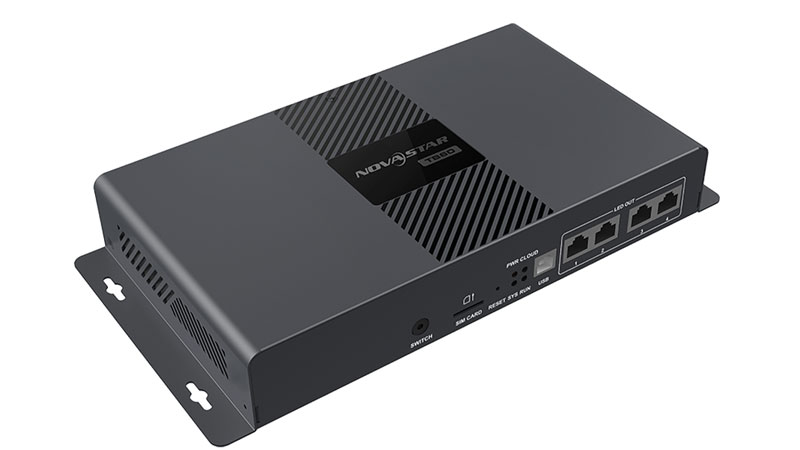
The TB60 is an LED control box with both transmission and playback capabilities. It supports logging into cloud platforms and cloud monitoring systems.
Once logged in, you can control the playback of content on LED displays across different regions via networked devices.
The Novastar TB60 boasts powerful adaptability and is widely used in LED commercial displays and smart infrastructure projects. Examples include high-definition fixed installation LED displays, shelf LED displays in the new retail industry, and smart city lamp pole displays.
What is TB40?
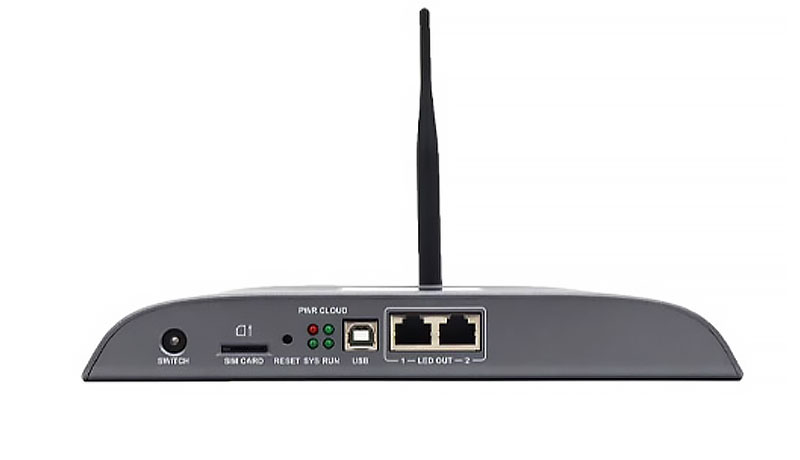
Novastar TB40 is a controller developed by Novastar specifically for full color LED displays. Both TB40 and TB60 belong to the NovaStar Taurus series.
You can use NovaStar’s control software to send edited programs from a PC, mobile phone, or iPad to the TB40 playback box, thereby controlling the content displayed on the LED screen.
TB60 vs TB40: Key Differences Between the Two Nova Playback Boxes
Now that we understand TB60 and TB40, let’s examine the differences between these two NovaStar playback boxes.
Load Capacity
TB60 boasts superior image processing capabilities, supporting a maximum load capacity of 2,300,000 pixels. It accommodates up to 4096 pixels in both width and height, enabling management of more pixels to control larger LED display screens.
The TB40 has a slightly lower loading capacity, maxing out at 1,300,000 pixels. However, its pixel width and height control capabilities match the TB60, both reaching 4096 pixels.
If you need to control larger LED display sizes, the TB60 controller is a better fit for your needs.
USB Ports
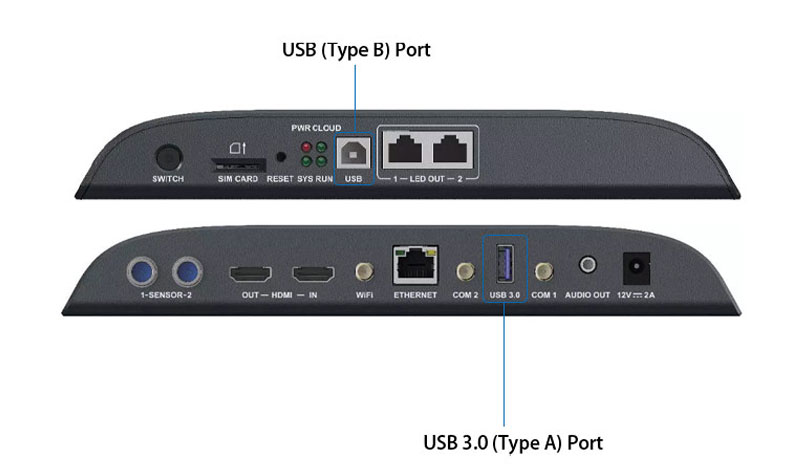
Both TB60 and TB40 feature two USB ports: one USB 3.0 (Type-A) port for playing content imported from USB drives, expanding storage capacity, and upgrading USB firmware; and one USB (Type-B) port for connecting to a computer to publish content and control the display on the LED screen.
Processing Power
Both the TB60 and TB40 deliver exceptional processing capabilities. Powered by a quad-core ARM A55 processor operating at 1.8GHz, they distribute tasks across four independent cores for swift, seamless handling of complex multimedia files.
Furthermore, both Nova TB60 and TB40 LED media players support 4K video decoding, ensuring high-quality 4K video playback on LED displays.
Ethernet Ports
The Nova TB60 media player features four Gigabit Ethernet ports, all configured as primary ports by default. You can designate two as primary and two as backup ports according to your needs, ensuring stable connections and efficient data transmission.
The Nova TB40 multimedia player has only two default Gigabit Ethernet ports. You can designate one as the primary port and the other as the backup port, enabling fast and efficient data transmission to the LED display.
If you require additional Ethernet interfaces to manage data transmission across multiple LED display cabinets, the Nova TB60 is the preferred choice.
Compatibility
Both the TB60 and TB40 offer extensive compatibility. They work with most LED modules and cabinets while supporting multiple resolutions (e.g., 1920×1080 or 1280×720).
Additionally, NovaStar TB60 and TB40 LED controllers are compatible with NovaStar receiver cards or other NovaStar controllers. They can collaborate to enable more advanced functions on LED displays.
Multi-Screen Synchronization
Both TB60 and TB40 enable simultaneous display of identical content across multiple screens. This is achieved through precise control of display content using NTP time synchronization, GPS time synchronization, or RF time synchronization.
These methods ensure every frame of the same segment is perfectly synchronized, delivering flawless visual output across all LED displays.
Note: GPS or RF synchronization requires installing a 4G module or RF module. TB60 and TB40 control boxes do not include 4G modules by default. Contact us for installation if needed.
Storage Capacity
Nova TB60 and TB40 LED controllers offer substantial storage of 32GB each to store critical files and applications. They handle various multimedia formats effortlessly without lag.
The Nova TB60 and TB40 can also store debugging files (e.g., rcg files) and other assets. For instance, if you accidentally misconfigure parameters during LED display debugging, you can restore the data using the rcg file stored in the Nova TB playback box.
Additionally, content stored on the TB60 and TB40 plays smoothly even without an internet connection.
Integration Capabilities
The TB60 and TB40 offer robust integration support, enabling connection to brightness sensors, temperature sensors, or humidity sensors. These sensors allow LED displays to respond promptly and sensitively to external environmental changes.
Support for 4G/5G/WiFi Modules
Both Nova TB60 and TB40 support 4G modules, enabling seamless integration between the controller and 4G networks.
When your controller version is below V4.5.0, it automatically selects connection signals based on priority: wireless network first, followed by WiFi, and finally 4G. If your controller version is V4.5.0 or higher, all these networks can coexist.
The TB60 and TB40 incorporate multiple signal modules to ensure LED displays consistently transmit and receive signals reliably. Even when 4G or 5G network coverage is weak, data transmission can be maintained via a LAN-based network.
Dimensions
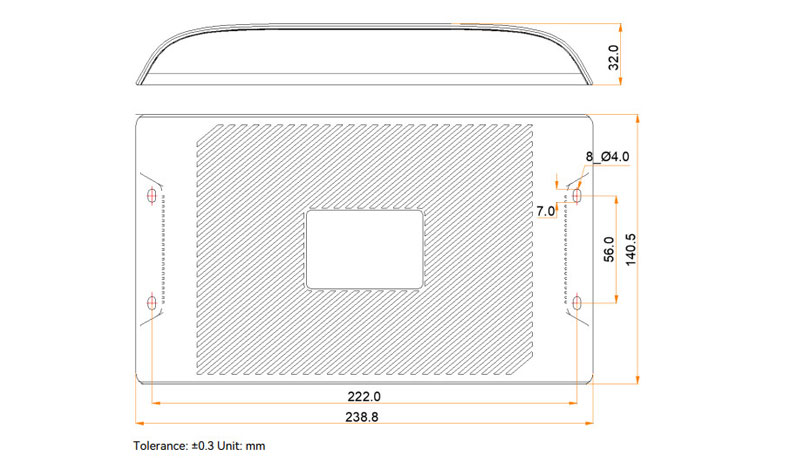
The Nova TB60 LED control box measures 274.3 mm × 139.0 mm × 40.0 mm. The Nova TB40 LED control box is slightly smaller than the TB60, measuring 238.8 mm × 140.5 mm × 32.0 mm.
You can choose the Nova controller that best suits your preferences.
To help you better understand the differences between the TB60 and TB40, we have compiled a comparison table.
| Novastar Taurus | TB60 | TB40 |
| Load capacity(dots) | 2300000 | 1300000 |
| USB port | Two USB ports | |
| processing capacity | Quad-core ARM A55 processor | |
| Ethernet port | 4 Gigabit Ethernet ports | Two Gigabit Ethernet ports |
| Compatibility | Better | |
| Multi-screen synchronization | can be achieved | |
| Storage capacity(GB) | 32 | |
| Integrated nature | Support | |
| 4G/5G/Wi-Fi Modules | ||
| Dimensions(mm) | 274.3×139.0×40.0 | 238.8 × 140.5 × 32.0 |
TB60 vs TB40: How to Choose?
If your budget allows and you require higher load capacity and additional Ethernet ports, we recommend prioritizing the NovaStar Taurus series TB60 controller.
If your budget is limited and load capacity demands are moderate, the NovaStar Taurus series TB40 remains an efficient solution for handling complex data and may be more suitable for your needs.
Frequently Asked Questions
Can I connect audio devices to the Novastar TB40?
Yes. The Novastar TB40 is specifically designed for stereo audio. Its internal audio source operates at a 48 kHz sampling rate, while external audio sources support multiple sampling rates such as 32 kHz, 44.1 kHz, or 48 kHz.
This enables synchronized audio effects for content displayed on LED screens, enhancing the overall viewing experience.
Can the TB40 and TB60 switch between Wi-Fi AP mode and Wi-Fi STA mode?
Yes, both the Novastar TB40 and TB60 multimedia players support both Wi-Fi AP mode and Wi-Fi STA mode.
What are the prices for the Novastar TB40 and Novastar TB60?
The Novastar TB40 LED controller is priced around $100-$200, while the higher-performance TB60 costs approximately $400. Actual prices may vary by LED Display supplier and region. Please contact us for real-time pricing.
What control software can I use to operate the Novastar TB40 and TB60?
Use Novastar’s official control software to manage the TB40 and TB60, such as ViPlex Handy or the ViPlex Express PC client software.
Can Novastar TB40 and Novastar TB60 be used with any LED display?
No. Novastar TB40 and Novastar TB60 require compatibility with Novastar-branded receiver cards, transmitter cards, and other components. Using third-party transmitter or receiver cards may cause incompatibility issues, such as screen flickering.
Can Novastar TB40 and Novastar TB60 support remote control?
Yes, both models support remote control of content displayed on LED screens.
Summary
This concludes our comprehensive comparison of the Novastar TB40 and Novastar TB60 LED controllers. For further details or to purchase Novastar TB controllers, please consult our sales consultants. They will discuss specific requirements and purchase options with you.

