



Conference room TVs are mainly used for presenting and sharing information, providing high quality visual displays for meetings. In this article, I will take you through the various aspects of conference room TVs.
Types of Conference Room TVs
Conference Room TV
Conventional TVs are used for live presentations and can display slides, videos, PPTs, pictures and shared documents, etc. They can effectively improve the nature of the meeting and allow participants to view the screen content more clearly, so that they can understand the relevant information explained in detail.
Conference Room TV with Camera
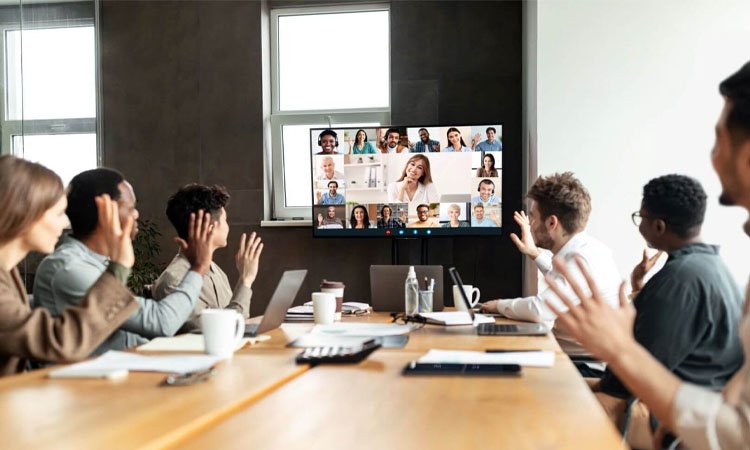
This kind of conference room TV can participate in the whole process of the meeting remotely through the network. It has a full HD camera to ensure that remote meeting participants can clearly see the conference room scene. Conference room TVs with cameras are equipped with built-in microphones and speakers, which allow both parties to hear each other clearly.
4K Conference Room TV
4K Conference Room TVs have an ultra-high resolution of 3840×2160. The higher the resolution the clearer the display will be, and even if viewed from close range, you can still get an accurate picture quality; for large-sized conference room TVs, the display is more realistic, giving people a sense of immersion.
Meeting Room Touch Screen TV
The most prominent feature of the conference room touch screen TV is the touch screen function, in the conference room with the use of stylus, can have a more efficient meeting collaboration, more convenient meeting demonstration, writing and labeling and so on.
Advantages of Conference Room TV
Durable
Conference Room TV is designed with features that can significantly reduce the risk of screen burn-in, so Conference Room TV is not prone to screen burn-in under prolonged use, thus enhancing the durability of Conference Room TV.
Long life
Conference room TVs usually use LCD technology, LCD service life can reach 60,000 hours, about 6–7 years of service life. Like in the conference room there is another kind of electronic screen made using LED display, this kind of display device is called LED all-in-one display, its service life is up to 100,000 hours, about 11–13 years of service life.
Color Accuracy
Conference room TVs have a very high resolution, both 2K and 4K, which provides accurate colors and gives conference room TVs a realistic display.
Strong Heat Dissipater
Conference room TVs can continue to operate in some high temperature environments because conference room TVs are usually equipped with a special cooling system, which allows them to be lag-free and hot even after prolonged use.
Long warranty
Conference room TVs have a long warranty period, and most businesses provide consumers with 1–3 years of warranty hours to provide consumers with more protection and reduce the cost of consumer repairs.
Strong compatibility
Conference room TVs are highly compatible, as they have many ports that are compatible with a variety of components; both older and newer computers are able to connect and operate with conference room TVs as long as they have the same ports as the conference room TV.
How to Choose Conference Room TV
Screen Size
The first step in choosing a conference room TV is to determine the size you need to avoid space occupation or the inability of meeting participants to see what is being displayed. Typically, you need to choose a TV size based on the size of your conference room and the distance of the furthest viewer in order to ensure visibility for meeting participants.
Display Resolution
Choosing a conference room TV with a clearer display will give participants a better display experience. 2K and 4K are both popular display resolutions on the market, and when choosing a great conference room TV, it’s not just about the higher pixels that make it the best.
If you just need to use it in a small conference room, it is recommended that you choose a conference room TV with 2K resolution. If you are using it in a large conference room, you will need a higher display resolution to ensure that every attendee can see the details.
Panel Technology
Typically, the panel technologies used in conference room TVs are LED, LCD, and OLED. LEDs emit their own light from each light-emitting diode, which provides excellent color vibrancy while consuming less energy.
LCD uses a special backlighting technology where the display panel is a liquid crystal layer, which consists of countless liquid crystal molecules, providing a more realistic display.OLED is also a self-luminous technology, which has a higher contrast ratio, which increases the layering and makes the display more lifelike, among other things.
Connectivity Options
A good conference room TV should be equipped with at least 5 connectivity options, with at least 3 HDMI ports alone, which can be used to connect to laptops, conferencing equipment, and projectors to allow the conference room TV to display laptop screens, or presentations, and so on.
In addition to this, it is also necessary to have a number of additional other equipment interfaces, such as for the connection of the speaker system, can make the meeting participants can be clearly identified.
Intelligent control
Common control systems for conference room TVs include touch screen control, remote control, and laser pointer control. Touch screen control can be used to control the conference room TV by touching the screen, which is a very convenient way of control.
Remote control is a very precise intelligent control, which can better match the meeting and avoid errors. Laser page flip pen control can better attract the participants’ eyeballs, so that participants can follow the speaker’s thoughts to understand and think, to carry out effective meetings.
Audio Quality
In smaller meeting rooms, the speakers of the conference room TV may be able to meet the needs of most people. Medium and large conference rooms need to be equipped with an external audio system to ensure that everyone attending the meeting has access to clear sound quality and can hear the speaker’s voice clearly.
Installation Options
There are three types of mounting options for TVs in conference rooms: wall-mounted, floor-mounted, and TV cabinet mounted. Wall-mounted installation can save more space and look more simple in appearance.

Floor-mounted mobile installation, more flexible, you can move the conference room TV at will or adjust the overall height, etc. The TV cabinet is placed in a more fixed way, this kind of installation is more traditional, it can hide many data cables or equipped components, so that the whole conference room is more concise.
How to set up Conference Room TV?
To set up a Conference Room TV, we need to talk about six steps:
Step 1
First, we need to download the digital signage application software.
Step 2
Next, create your account in the application and log in to your account.
Step 3
Once logged in we need to connect the display. First go to the Add Screen section, after adding a window will pop up, the window shows that you need to enter a four-digit code and click on the pairing, you can link the conference room TV with the digital signage application software.
Step 4
Find the “Media” tab on the digital signage software and click the upload button, then you can add the files you need to the conference room TV.
Step 5
Next, we need to find the “Playlist” option on the Media tab. Click on the “Canvas” control panel, find the “Template Library”, and find your favorite design style in it. You can also go to the editor to customize your own templates, such as custom colors, fonts, and so on.
Step 6
After saving your template design, add it to the playlist.
You can also click on the publish button to be able to preview your design.
What are the best conference room TVs on the market that are worth getting?
With the rise of most businesses nowadays, there is a growing demand for conference room TVs. Here are a few of the more popular conference room TVs:
Samsung QMC 50-inch Commercial Monitor
With an ultra-thin 28.5mm design, this conference room TV has a lightweight, clean body that is perfect for modern needs; it also holds a 4K TV in Dynamic Crystal Color with screen sizes ranging from 43 inches to 98 inches.
Sony BZ30L UHD 4K HDR Screen 43 inches – 85 inches
This is a 4K conference room TV with 440 nits brightness, it has a 16:9 aspect ratio, as well as excellent color performance and image processing technology, with a screen size of 43 inches – 85 inches.
LG 4K Ultra HD Smart TV
This conference room TV has been released a long time ago, but its excellent features have impressed many people. It has amazing color vibrancy and Ultra HD resolution, enabling images and videos to be presented with clarity and detail, with screen sizes ranging from 42 inches – 86 inches.
TCL 6 Series Mini-LED QLED TVs
It is a cost-effective conference room TV at an affordable price. Its contrast ratio appears more prominent relative to the same price, and has a high frame rate, there is a smoother display picture; screen size of 55 inches – 85 inches.
Summarize
This article mainly talks about the advantages of conference room TVs and how to choose a good conference room TV, and also recommends several popular conference room TVs on the market, which we hope will be helpful to you.

