



Cleaning your LED computer screen is crucial to maintaining its performance and longevity, for example, regular cleaning of your LED computer screen can prevent the growth of dust, stains and bacteria.
This guide will take you through the most effective ways to clean your LED computer screen, help you avoid common mistakes, and give you a streak-free, clear LED computer screen.

Tools to prepare for cleaning your LED computer screen
Before you start cleaning your LED computer screen, please prepare the following common cleaning tools:

Two or more microfiber cloths or lint-free cloths
Because the microfiber cloth is soft enough to wipe without scratching the surface of the LED computer screen, and it can absorb both water and oil. In addition to needing a microfiber cloth for wiping, you also need to use a microfiber cloth to remove stubborn stains, so it’s best to prepare more than two microfiber cloths. If you don’t have a microfiber cloth, a lint-free cloth will also work.
Disinfectant wipes
In addition to their cleaning function, LED computer screen cleaning wipes also have a disinfecting function. It can effectively remove bacteria and microorganisms from the keyboard and mouse.
Distilled Water
While a dry microfiber cloth is the key to cleaning your LED computer screen, sometimes it may not be able to remove stubborn stains. When the stubborn stains cannot be wiped by the microfiber cloth, we can use another microfiber cloth dipped in distilled water, this is because distilled water helps to remove the stubborn marks.
Cotton swab
Dipping a cotton swab in distilled water helps in cleaning the corners and edges of the LED computer screen. Apart from this it also cleans the hard to reach crevices on the keyboard and mouse.
Cleaning Solution
There are many products available in the market that specialize in cleaning LED computer screens. With the wide range of cleaning products available, choose one that is mild and non-irritating. Make sure that it is suitable for LED computer screens and has no side effects.
Soft Brush
Some dust and impurities can settle on the device, such as on the crevices of the keyboard and mouse. These crevices are narrow and difficult to clean, so a soft bristle brush is handy to clean the dust out of the crevices.
Steps for cleaning LED computer screen
When cleaning your LED computer screen, follow these steps to ensure a safe and effective process:
Step 1: Read the instruction manual of the LED computer screen
LED computer screens come with an instruction manual that helps us understand how to use and maintain the device. Therefore, before cleaning your LED computer screen, you need to read the instruction manual. In particular, please read carefully the section on how to successfully clean it to achieve the cleaning purpose.
Step 2: Turn off the LED computer screen and power supply
Cleaning the surface of your LED computer while it is turned on may not only cause damage to the screen, but it may also cause safety issues like electrocution. So turn off the LED computer screen and power before you start cleaning. Also, it is easier to see dust and stains when the LED computer screen is black.
Step 3: Wipe the dust from the LED computer screen with a clean microfiber cloth
Microfiber cloths are essential because they are lint-free and gentle on LED computer screens. If you use ordinary rags, paper towels may have friction and also damage your LED computer screen.
Therefore, you need to use a clean microfiber cloth. Start the microfiber cloth from the top of the screen and gently wipe it from left to right. After that, switch to the clean side of the cloth and wipe the screen from top to bottom. This will remove surface dust and some minor stains.
Step 4: Spray the microfiber cloth
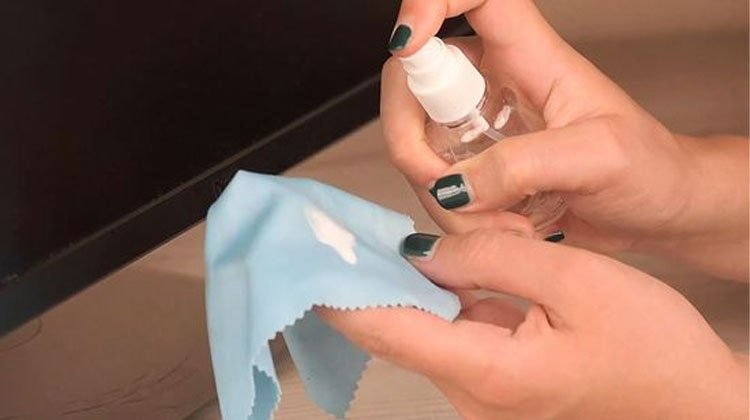
If the dry microfiber cloth hasn’t completely removed the dirt from the LED computer screen, then spray distilled water onto another clean microfiber cloth. Do not spray directly onto the LED computer screen as it may cause component failure.
Step 5: Wet Wash to Remove Stains and Adhesive Dirt from LED Computer Screen
Gently clean the screen with a spray-wet microfiber cloth in a circular motion. Focus on cleaning the stains or adhering dirt on the LED computer screen.
Step 6: Tackle Stubborn Stains on LED Computer Screens
In most cases, just a little bit of distilled water on a microfiber cloth will clean it. However, there are stubborn stains that cannot be solved by distilled water alone.
Therefore, it is necessary to dip another microfiber cloth into a mild cleaning solution and wring out the excess. Wipe the screen repeatedly in multiple circular motions, which should remove all remaining stubborn stains.
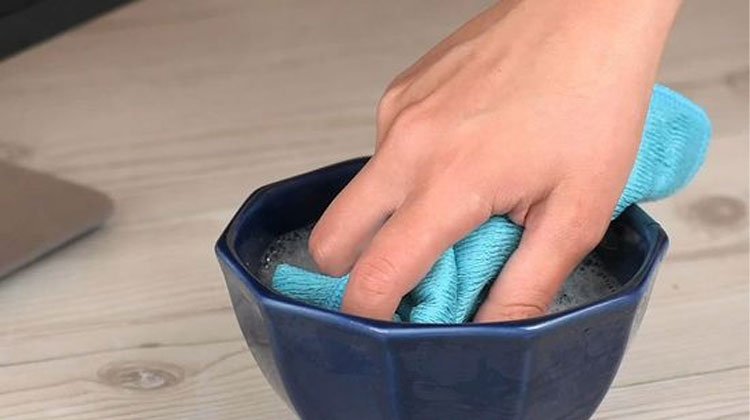
Step 7: Use a cotton swab dipped in distilled water to clean tiny areas
Of course, we can’t leave the corners of the LED computer screen alone. Where the microfiber cloth can not clean, we use a cotton swab dipped in distilled water to clean, especially the edges and four corners of the LED computer screen.
Step 8: Clean the frame, base and back of the LED computer screen
When we clean the LED computer screen, we must not forget to clean the frame and base. You can use the cleaner to lightly spray on a microfiber cloth, and then gently wipe along the frame, base and back of the LED computer.
Step 9: Clean the LED computer mouse, keyboard
To clean the mouse and keyboard of the LED computer, we first need to use a clean microfiber cloth to gently wipe off the dust on the mouse and keyboard.
Secondly, if there are hard to reach crevices, you can use a fine soft brush or a cotton swab dipped in distilled water to clean them. Finally, you can also wipe with disinfectant wipes, which can effectively remove bacteria from the keyboard and mouse.
Step 10: Dry the LED computer screen
Wipe the screen one last time with a clean microfiber cloth to make sure that the screen is streak and droplet free. After wiping it clean, let the screen air dry for a while before turning on the LED computer screen.
Caution:
Do not spray liquid cleaner directly on the screen
If you spray liquid cleaner directly on the screen, it is likely to drip down to the edges of the LED computer screen, and it will easily seep into the monitor itself and damage the original parts inside.
Do not use products containing ammonia and alcohol
Ammonia and alcohol can cause irreversible damage to the coating of the LED computer screen, as well as cause the LED computer screen to become cloudy and affect the viewing experience.
When choosing a cleaning solution, browse through the cleaning solution’s instructions and avoid cleaning solutions that explicitly contain alcohol and ammonia.
Don’t use too much force
When cleaning your LED computer screen, you may encounter stubborn dirt that takes extra force to clean. If this happens, do not press too hard. Excessive pressure can seriously damage the surface or anti-gloss coating. Spray the cleaning solution onto a microfiber cloth. Then gently clean the area up and down or in a circular motion.
Don’t use ordinary cleaning products
The chemicals in these products are more harsh and powerful. If you use ordinary cleaning products to clean your LED computer screen, you can cause great damage to the screen and affect the viewing experience.
Don’t Ignore the Manufacturer’s Instructions
Do not ignore the manufacturer’s instructions as this can cause damage during cleaning and may void the warranty.
Question Answered:
Why do I need to turn off my LED computer screen and power first?
Safety hazards like electrocution may occur if the LED computer screen is not turned off, and turning off the LED computer screen also helps us to clean it and make it easier to see the impurities on the screen.
Is the LED display cleaned in the same way as the LED computer screen?
Yes, LED displays are generally cleaned similarly to LED computer screens, except that LED displays do not have additional accessories like keyboards and mice to clean.
How often should I clean my LED computer screen?
The frequency of cleaning depends on your usage. It is recommended that you clean your LED computer screen once a month to maintain optimal viewing experience and performance. However, if you notice a lot of dust and stains, please clean as needed.
Why can’t I spray cleaners or liquids directly onto my LED computer screen?
If you spray a cleaner or liquid on the screen, the liquid will form small droplets. The droplets will seep into the keyboard or other areas and damage the LED computer screen.
After cleaning, do I have to wait for the LED computer screen to air dry before I can turn it on again?
Yes. Excess liquid left on the LED computer screen can seep into small cracks and seams, so wait for the LED computer screen to air dry before opening it again.
What is the best thing to avoid when cleaning my LED computer screen?
Not only should you avoid wiping the screen with items like paper towels, toilet paper, Kleenex, etc., but also avoid chemicals that contain ammonia, alcohol, and other such harsh chemicals.
Conclusion
As you can see from the above, cleaning an LED computer screen is not complicated. By following the simple steps in the article and avoiding harsh chemicals, you can clean your LED computer screen. A clean and clear screen not only looks more aesthetically pleasing, but also gives you a great viewing experience.

